Smarter Production Calendar & Automatic Department Scheduling
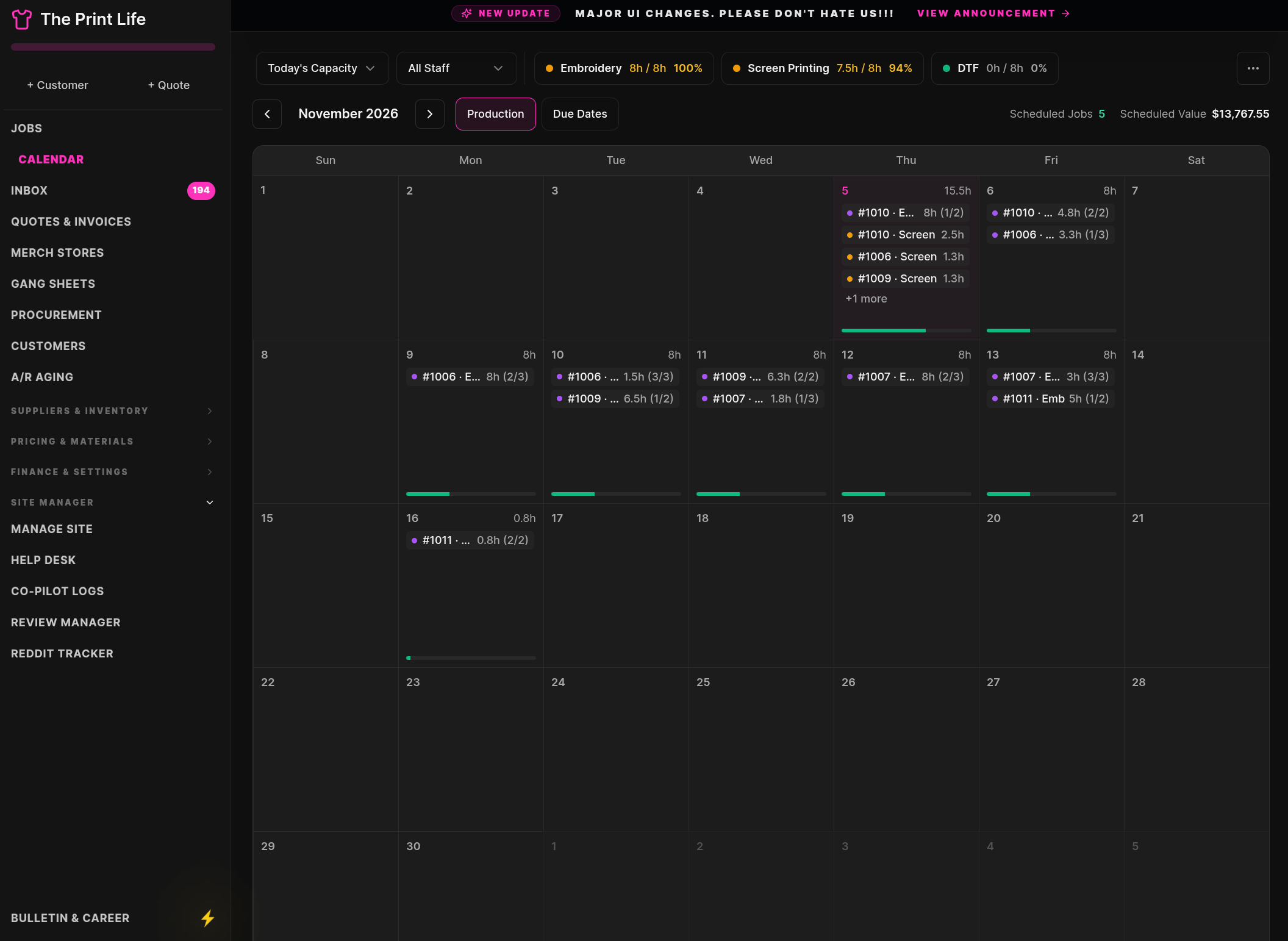
We just rolled out a huge upgrade to the Production Calendar and how your jobs get scheduled!
Before today, scheduling a job meant picking one single date for the whole order—and you had to guess which days were already full. Now, the calendar does the heavy lifting for you automatically, broken down by Department.
Here is everything the new calendar does for your shop:
1. Automatic Scheduling When a Quote Turns Into an Invoice
The moment you take a payment on a quote (and it converts to an Invoice), the system automatically schedules the job onto your Production Calendar for you!
- It looks at the print methods on the order (like Screen Printing, Embroidery, or DTF).
- It checks how many hours the job will take based on your price matrix speed settings.
- Then, it searches your calendar starting today, skips your closed days (like weekends), and drops the job into the next open day that has free hours in that department.
2. Every Department Schedules On Its Own
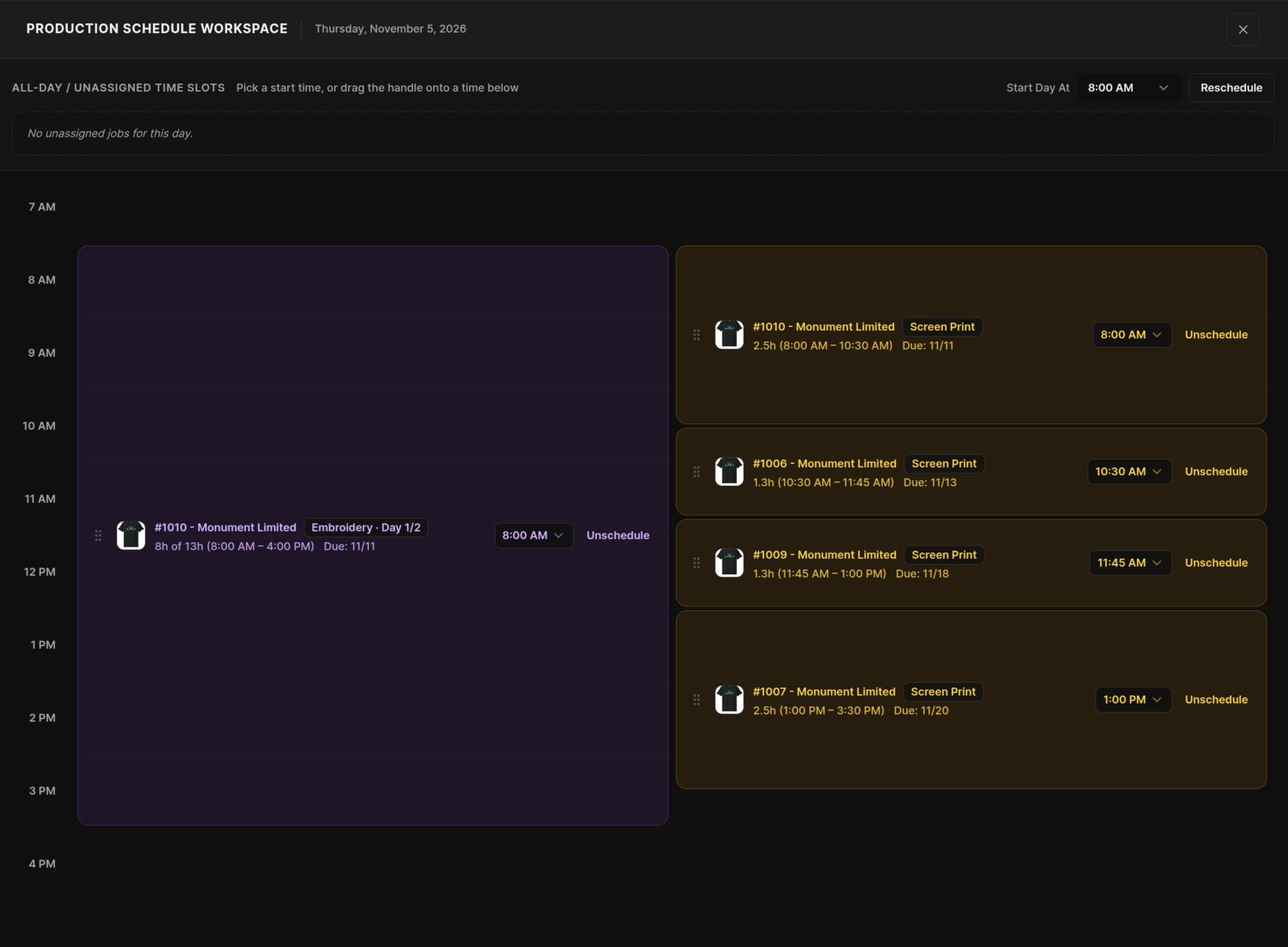
If a single order has both Screen Printing and Embroidery on it, they don't get lumped together anymore!
- Your Screen Printing work gets scheduled into the next open Screen Printing slot.
- Your Embroidery work gets scheduled into the next open Embroidery slot.
- If your embroidery machines are backed up for 3 days, but your screen print presses are open tomorrow, each department gets put on the exact right day.
3. Big Jobs Automatically Split Across Multiple Days
What happens if you have an 8-hour workday, and a giant 12-hour job comes in? Or what if today only has 2 free hours left?
- The scheduler will fill up the remaining 2 hours today, and automatically roll the rest of the hours into the next open workday until the whole job is scheduled.
- It will never overbook a day when auto-scheduling!
4. One-Click Department Filters on the Calendar & Dashboard
At the top of your Jobs Dashboard and Production Calendar, you will see your department capacity pills (like Embroidery, Screen Printing, and DTF).
- Click any department pill to filter the calendar so you only see jobs and hours for that department.
- Click the timeframe dropdown (Today's Capacity, Tomorrow, This Week, Next Week, Next 14 Days, or Next 30 Days) to see right away how full each department is for the week or month ahead.
5. Easy Manual Changes Anytime You Want
You are always in full control if you need to move things around:
- Drag and Drop: Drag any job card on the calendar from one day to another. If you have a department filter turned on (like Embroidery), dragging the card moves only the Embroidery dates!
- Production Schedule Pop-Up: Click the schedule button on any job to see a clean breakdown of its hours by department. From there, you can pick custom dates for each department, or click Auto-Find Open Slot and let the system find the next open day for you with one click.
- Day View: Click any day on the calendar to see every job scheduled that day, how many hours each department is using, and move jobs to a new date in seconds.
We built this so you never have to guess when your shop can fit in the next job. Give it a try on your next invoice and let us know what you think!